|
|
◆ WZtrtrs()
| Function WZtrtrs |
( |
Uplo As |
String, |
|
|
N As |
Long, |
|
|
A As |
Variant, |
|
|
B As |
Variant, |
|
|
Optional Trans As |
String = "N", |
|
|
Optional Nrhs As |
Long = 1 |
|
) |
| |
Solution to system of linear equations AX = B, ATX = B or AHX = B for a complex triangular matrix
- Purpose
- WZtrtrs solves a triangular system of the form
A * X = B, A^T * X = B or A^H * X = B
To represent complex numbers in Excel cells, complex number format in Excel (e.g. 2.5+1i) is used. Worksheet function Complex can be used to input complex numbers into cells.
- Returns
- N+2 x Nrhs
| Column 1 | Column 2 | . . . | Column Nrhs |
| Rows 1 to N | Solution matrix X |
| Row N+1 | Reciprocal condition number | 0 | . . . | 0 |
| Row N+2 | Return code | 0 | . . . | 0 |
Return code.
= 0: Successful exit.
= i > 0: The i-th diagonal element of the factor is zero. (Matrix A is singular)
- Parameters
-
| [in] | Uplo | = "U": A is upper triangular matrix.
= "L": A is lower triangular matrix. |
| [in] | N | Number of linear equations, i.e., order of the matrix A. (N >= 1) |
| [in] | A | (N x N) N x N coefficient matrix A. (If Uplo = 0, the lower triangular part will be used. If Uplo = 1, the upper triangular part will be used) |
| [in] | B | (N x Nrhs) N x Nrhs right hand side matrix B. |
| [in] | Trans | (Optional)
Specifies the form of the system of equations. (default = "N")
= "N": A * X = B. (no transpose)
= "T": A^T * X = B. (transpose)
= "C": A^H * X = B. (conjugate transpose) |
| [in] | Nrhs | (Optional)
Number of columns of right hand side matrix B. (Nrhs >= 1) (default = 1) |
- Reference
- LAPACK
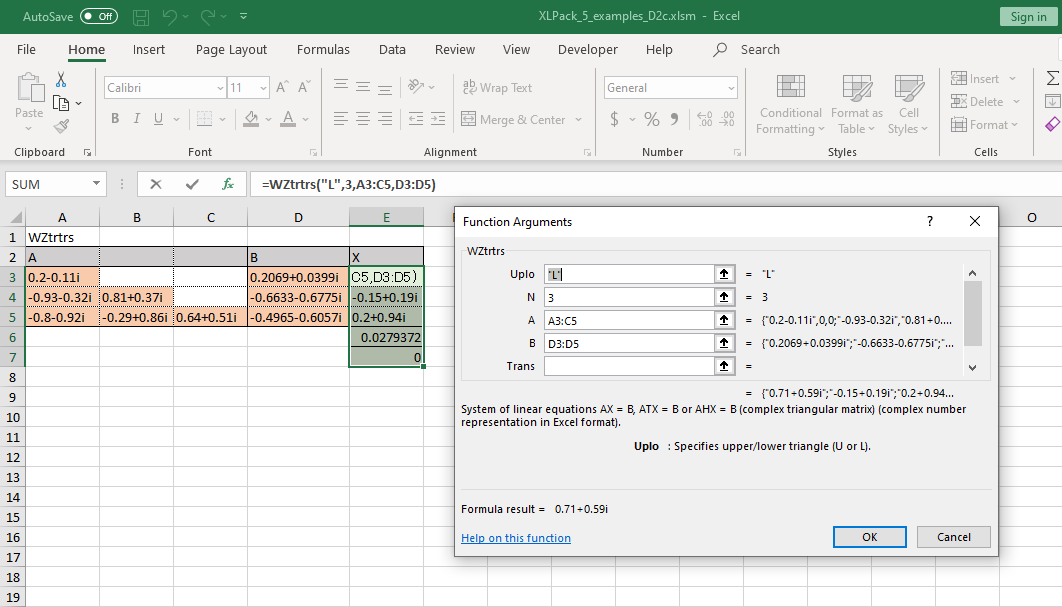
- Example
- Solve the system of linear equations Ax = B and estimate the reciprocal of the condition number (RCond) of A, where A is a triangular matrix and
( 0.20-0.11i 0 0 )
A = ( -0.93-0.32i 0.81+0.37i 0 )
( -0.80-0.92i -0.29+0.86i 0.64+0.51i )
( 0.2069+0.0399i )
B = ( -0.6633-0.6775i )
( -0.4965-0.6057i )
|

 1.9.6
1.9.6