
14. Nonlinear Least Squares Method
Note – This document was created using AI translation.14.1 Overview
Consider a set of \(m\) measurement data points:
\[
(x_i, y_i) = (x^*_i + e_{x_i}, y^*_i + e_{y_i}) \space (i = 1 \sim m)
\]
where each data point \((x_i, y_i)\) contains measurement errors (\(e_{x_i}\) and \(e_{y_i}\)) relative to the true values \((x^*_i, y^*_i)\).
Each true value satisfies a function:
\[
y^*_i = F(x^*_i)
\]
The elements of the \(n\)-vector \(\boldsymbol{c}\) consist of \(n\) parameters \(c_1, c_2, \dots, c_n\). We approximate the function \(F(x)\) using a general function \(f(x; \boldsymbol{c})\), which includes these \(n\) parameters and is referred to as the model function.
\[
F(x) \simeq f(x; \boldsymbol{c}) = f(x; c_1, c_2, \dots, c_n)
\]
One method for determining the parameters \(\boldsymbol{c}\) so that the model function \(f(x; \boldsymbol{c})\) best fits the data is nonlinear least squares.
The parameters \(\boldsymbol{c}\) are chosen to minimize the the sum of squared residuals:
\[
\sum_{i=1}^m r_i(\boldsymbol{c})^2
\]
where
\[
r_i(\boldsymbol{c}) = f(x_i; \boldsymbol{c}) – y_i
\]
14.2 Solution to Nonlinear Least Squares Method
For the \(n\)-vector \(\boldsymbol{x}\), we consider the following function \(R(\boldsymbol{x})\):
\[
R(\boldsymbol{x}) = (1/2)\boldsymbol{r}(\boldsymbol{x})^T\boldsymbol{r}(\boldsymbol{x}) = \sum_{i=1}^m r_i(\boldsymbol{x})^2
\]
where,
\[
\boldsymbol{r}(\boldsymbol{x}) =
\begin{pmatrix}
r_1(\boldsymbol{x}) \\
r_2(\boldsymbol{x}) \\
\vdots \\
r_m(\boldsymbol{x}) \\
\end{pmatrix}
\]
That is, \(R(\boldsymbol{x})\) represents the sum of squares of \(r_i(\boldsymbol{x})\).
In this case, the gradient \(\nabla R(\boldsymbol{x})\) and the Hessian matrix \(\boldsymbol{H}(\boldsymbol{x})\) can be expressed as follows.
\[
\nabla R(\boldsymbol{x}) = \boldsymbol{J}(\boldsymbol{x})^T\boldsymbol{r}(\boldsymbol{x}) \\
\boldsymbol{H}(\boldsymbol{x}) = \boldsymbol{J}(\boldsymbol{x})^T\boldsymbol{J}(\boldsymbol{x}) + \boldsymbol{S}(\boldsymbol{x}) \\
\]
where, \(\boldsymbol{J}(\boldsymbol{x})\) is the Jacobian matrix, and \(\boldsymbol{S}(\boldsymbol{x}) = \sum_{i=1}^m \partial^2r_i(\boldsymbol{x})/\partial x_j\partial x_k \space r_i(\boldsymbol{x}) \space (j, k = 1 \sim n)\).
That is, when applying Newton’s method for nonlinear optimization with \(R(\boldsymbol{x})\) as the objective function, the special structure of \(R(\boldsymbol{x})\) as the sum of squares of \(r_i(\boldsymbol{x})\) allows the gradient and Hessian matrix required in the iterative formula to be obtained using the Jacobian matrix.
At this point, using \(f(x; \boldsymbol{c})\) and \(y\) from Section 14.1, we redefine \(r_i\) as follows:
\[
r_i(\boldsymbol{c}) = f(x_i; \boldsymbol{c}) – y_i \space (i = 1 \sim m)
\]
That is, \(r_i\) is a function of the parameters \(\boldsymbol{c}\) and represents the residual of the model function value for the \(i\)-th measurement data. By defining the sum of squared residuals \(R(\boldsymbol{c})\) as the objective function, we can solve the nonlinear optimization problem to obtain the nonlinear least squares solution for \(\boldsymbol{c}\). In this process, the gradient and Hessian matrix required for the iteration can be computed using the Jacobian matrix.
Hereafter, we will express \(\boldsymbol{c}\) using \(\boldsymbol{x}\) and denote it as \(R(\boldsymbol{x})\) again.
14.2.1 Gauss-Newton Method
We solve the nonlinear optimization problem with \(R(\boldsymbol{x})\) as the objective function using Newton’s method. However, when computing the Hessian matrix, we approximate it by omitting the \(\boldsymbol{S}(\boldsymbol{x})\) term (i.e., assuming \(\boldsymbol{S}(\boldsymbol{x}) = 0\)).
With this approximation, the direction \(\boldsymbol{d_k}\) vector can be obtained by solving the following system of linear equations:
\[
\boldsymbol{J}(\boldsymbol{x_k})^T\boldsymbol{J}(\boldsymbol{x_k})\boldsymbol{d_k} = -\boldsymbol{J}(\boldsymbol{x_k})^T\boldsymbol{r}(\boldsymbol{x_k})
\]
This equation is in the form of the normal equations used in linear least squares. Instead of solving it directly, we use methods such as QR decomposition, similar to linear least squares. (See Chapter 4.)
14.2.2 Levenberg-Marquardt Method
In the Gauss-Newton method, the Jacobian matrix may lose rank during iteration, leading to the issue where the system of linear equations cannot be solved.
To resolve this, the Levenberg-Marquardt method introduces a parameter \(\lambda_k\) and adds the term \(\lambda_k\boldsymbol{I}\) to ensure that the coefficient matrix remains positive definite.
\[
(\boldsymbol{J}(\boldsymbol{x_k})^T \boldsymbol{J}(\boldsymbol{x_k}) + \lambda_k \boldsymbol{I})\boldsymbol{d_k} = -\boldsymbol{J}(\boldsymbol{x_k})^T\boldsymbol{r}(\boldsymbol{x_k})
\]
If \(\lambda_k = 0\), the method is identical to the Gauss-Newton method. When \(\lambda_k\) becomes large, the method becomes the steepest descent method.
The convergence behavior varies based on the choice of \(\lambda_k\), and several strategies have been proposed for determining its value.
14.3 Solving Nonlinear Least Squares Using XLPack
The Levenberg-Marquardt method can be implemented using the VBA subroutine Lmdif1. This subroutine calculates derivatives (Jacobian matrix) using finite difference approximation, eliminating the need for users to compute derivatives. Lmdif1 can also be accessed from the XLPack solver.
Similar to nonlinear optimization, it is essential to provide an initial value that is as close as possible to the desired solution.
Example Problem
We use test data published on the NIST (National Institute of Standards and Technology) website (https://www.itl.nist.gov/div898/strd/nls/data/misra1a.shtml).
The following model function is used.
\[
f(x) = c_1(1 – exp(-c_2x))
\]
The data is as follows:
\[
\begin{array}{cccc}
\hline
y & x \\ \hline
10.07 & 77.6 \\
14.73 & 114.9 \\
17.94 & 141.1 \\
23.93 & 190.8 \\
29.61 & 239.9 \\
35.18 & 289.0 \\
40.02 & 332.8 \\
44.82 & 378.4 \\
50.76 & 434.8 \\
55.05 & 477.3 \\
61.01 & 536.8 \\
66.40 & 593.1 \\
75.47 & 689.1 \\
81.78 & 760.0 \\
\hline
\end{array}
\]
When this data is plotted, it appears as follows.
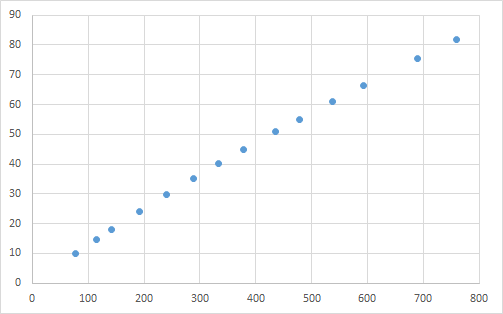
The test data has two specified initial values (500, 0.0001) and (250, 0.0005). The known solutions are \(c_1 = 2.3894212918 \times 10^2\) and \(c_2 = 5.5015643181 \times 10^{-4}\).
14.3.1 Solving Using a VBA Program (1)
Below is an example program using Lmdif1.
Const Ndata = 14, Nparam = 2
Dim Xdata(Ndata - 1) As Double, Ydata(Ndata - 1) As Double

Sub F(M As Long, N As Long, X() As Double, Fvec() As Double, IFlag As Long)
    Dim I As Long
    For I = 0 To M - 1
        Fvec(I) = Ydata(I) - X(0) * (1 - Exp(-Xdata(I) * X(1)))
    Next
End Sub

Sub Start()
    Dim X(Nparam - 1) As Double, Fvec(Ndata - 1) As Double, Tol As Double
    Dim Info As Long, I As Long
    '--- Input data
    For I = 0 To Ndata - 1
        Xdata(I) = Cells(9 + I, 1)
        Ydata(I) = Cells(9 + I, 2)
    Next
    '--- Start calculation
    Tol = 0.0000000001  '** 1e-10
    For I = 0 To 1
        '--- Initial values
        X(0) = Cells(6 + I, 1)
        X(1) = Cells(6 + I, 2)
        '--- Nonlinear least squares
        Call Lmdif1(AddressOf F, Ndata, Nparam, X(), Fvec(), Tol, Info)
        '--- Output result
        Cells(6 + I, 3) = X(0)
        Cells(6 + I, 4) = X(1)
        Cells(6 + I, 5) = Info
    Next
End Sub
The objective function is prepared as an external subroutine, and Lmdif1 is called by specifying the initial values and required precision. Lmdif1 performs iterative calculations starting from the given initial approximate solution and determines the least-squares solution in its vicinity.
When executing this program, the following results were obtained. Additionally, a graph was created using the computed values (orange line) and data points (blue dots).

In this example, the correct solution was obtained for both initial values.
14.3.2 Solving Using a VBA Program (2)
Below is an example program using the reverse communication version (RCI) program Lmdif1_r.
Sub Start_r()
    Const M As Long = 14, N As Long = 2
    Dim X(Nparam - 1) As Double, Fvec(Ndata - 1) As Double, Tol As Double
    Dim Info As Long, I As Long, J As Long
    Dim XX(Nparam - 1) As Double, YY(Ndata - 1) As Double, IRev As Long, IFlag As Long
    Dim Xdata(Ndata - 1) As Double, Ydata(Ndata - 1) As Double
    '--- Input data
    For I = 0 To Ndata - 1
        Xdata(I) = Cells(9 + I, 1)
        Ydata(I) = Cells(9 + I, 2)
    Next
    '--- Start calculation
    Tol = 0.0000000001  '** 1e-10
    For I = 0 To 1
        '--- Initial values
        X(0) = Cells(6 + I, 1)
        X(1) = Cells(6 + I, 2)
        '--- Nonlinear least squares
        IRev = 0
        Do
            Call Lmdif1_r(Ndata, Nparam, X(), Fvec(), Tol, Info, XX(), YY(), IRev)
            If IRev = 1 Or IRev = 2 Then
                For J = 0 To Ndata - 1
                    YY(J) = Ydata(J) - XX(0) * (1 - Exp(-Xdata(J) * XX(1)))
                Next
            End If
        Loop While IRev <> 0
        '--- Output result
        Cells(6 + I, 3) = X(0)
        Cells(6 + I, 4) = X(1)
        Cells(6 + I, 5) = Info
    Next
End Sub
In the RCI subroutine, instead of passing the objective function as an external function, when IRev = 1 or 2, the function values are computed using XX(), stored in YY(), and then Lmdif1_r is called again. For more details on RCI, refer to here.
Executing this program yields the same results as before.
14.3.3 Solving Using the Solver
You can also solve it using the “Nonlinear Least Squares Approximation” of the XLPack Solver add-in. In column C, model function values are calculated using the parameter values in B8 and C8. For example, the formula (=B$8*(1-EXP(-C$8*A11))) is entered into cell C11. In column D, residuals are computed. For instance, the formula =B11-C11 is entered into cell D11. The solver then determines the least squares solution based on these residuals.

For more information about the solver, refer to this link.


